
Corporate catalog design: from the basics to optimizing brand value

A corporate catalog is often treated as a document for “putting products on paper”. For B2B companies and SMEs, that view is too narrow. A good catalog does not only answer what the business sells; it also helps readers understand who the business is, where its capabilities lie, which products deserve attention and what the next step should be. Catalog design is therefore a problem of organizing information, positioning and guiding decisions, and visual form is only one part of that system.
KEY TAKEAWAY
An effective catalog is not the one that contains the most products but the one that helps the right people quickly recognize the value that suits them and know what to do next.
A catalog starts not with design but with positioning
The most common mistake in making a catalog is to open InDesign, PowerPoint or other design software before answering a more important question: what should this catalog make readers understand about the business?
If a business only supplies a list of products, the catalog quickly becomes a “price list with pictures”. Readers may learn the name, item code, size or technical specifications, but not necessarily why they should choose this business over another supplier.
In a B2B setting the problem is even clearer. Decision makers rarely judge a single product in isolation. They may weigh supply capacity, fit with their needs, the consistency of the range, the ability to deliver and the supplier’s reliability all at once.
Therefore, before designing, define at least three layers of information:
- What value does the business offer? Not only the product, but the problem the product helps customers solve.
- Which advantage should be remembered? This could be the range, capability, expertise, flexibility or another trait the business has established.
- What decision do readers need to make after viewing the catalog? Find a product, compare the range, request a quote, ask for advice or continue the conversation with the sales team?
These three questions determine the catalog’s structure before color, typeface or imagery is chosen.
PRINCIPLE 01
Catalog design is a problem of organizing decisions
Each catalog page should help readers take one more step in understanding, evaluating or choosing. If a visual element is attractive but does not help recognition, comprehension or action, its value needs to be reconsidered.
Understand readers before planning pages
A catalog should not be designed for “all customers” if the business actually serves several groups with different needs.
A distributor, an architect, a purchasing department and an end consumer may look at the same product range, but they are not necessarily looking for the same information.
For example, a B2B buyer may care about specifications, product groups, capacity or the structure of the range, whereas for an end user, real-life images, function and how the product feels may matter more.
So instead of starting with the question “How should the catalog look?”, start with:
Who will read it? In what context will they read it? What do they need to decide?
FRAMEWORK
Three layers of information to plan
- Information about the business: who the business is, what value it offers and how it wants to be recognized.
- Information about the product: which product, for which need, and what makes it different or noteworthy.
- Information about the decision: what readers need to know to move from viewing the catalog to the next step.
Once these three layers of information are defined, layout is no longer a matter of “dividing the boxes nicely” but a way of organizing a path of understanding.
Product ranges do not always need to be treated equally

One of the hardest problems in corporate catalogs is a range that is too large.
When there are dozens or hundreds of products, the natural reflex is to give each one roughly the same space. The result is usually pages crowded with images, item codes, specifications and descriptions, where no product truly stands out.
In terms of information, this creates a paradox: the harder a catalog tries to give every product the same chance to appear, the harder it becomes for readers to see what matters.
Not every product plays the same role in the business strategy. There are flagship products, revenue drivers, products with healthy margins, products that extend the range, and others that mainly play a supporting role.
The catalog should reflect that logic.
From a “product list” to a “range architecture”
Instead of simply arranging products in item-code order, a business can plan them by criteria that match how customers search:
- Need groups.
- Application groups.
- Functional groups.
- Segment groups.
- Flagship and supporting product groups.
- Related product groups within the same purchase decision.
In that case, the catalog does not only answer “what do we have”, but also “which group fits your needs”.
COMMON MISTAKE
“Put every product at the same level to be fair.”
Why it is not enough
A catalog is not a pure database. It is a communication tool. If every product has the same size, the same prominence and the same amount of information, readers have to build their own order of priority. A clear visual hierarchy lets a business direct attention deliberately, without exaggerating the value of any single product.
Product imagery must serve recognition, not just decoration

Images are among the elements that most directly shape how a catalog is perceived, but “many images” does not mean “effective imagery”.
For products that need to be judged directly, a clear photograph on a suitable background lets readers focus on shape, material, structure and detail. Where the point is to explain how a product lives in everyday use, lifestyle imagery plays a different role: it places the product in a context so viewers can picture how it is used.
These two kinds of images should not be seen as substitutes for each other.
A good product photo answers the question “what is the product?”
A lifestyle photo works better when it needs to answer “how does the product appear in its context of use?”
So a catalog can combine both, but it must be done deliberately.
EXAMPLE
A page introducing a piece of furniture can use a product photo on a clean background so readers see the shape, size and main details. A photo of a space where the product is actually in use then adds context.
The two images do not compete for the same task. One clarifies the object; the other clarifies the experience and context.
This shows that images in a catalog should be chosen for their information task rather than only for being “beautiful”.
The cover must make clear why readers should keep reading
The cover is the first touchpoint and usually has a very simple job: to establish immediately who the catalog belongs to, what it is about and what kind of value it offers.
A cover with generic imagery may look polished but rarely creates a distinctive association. Imagery built specifically for the business, by contrast, connects product, capability and identity more effectively.
This matters especially when a business works in an industry where many images look alike.
A catalog of building materials, furniture, household goods or industrial equipment easily falls into using images that competitors could use as well. The difference then no longer lies in the images the business owns, only in how they are laid out.
Proprietary imagery does not have to be elaborate
Proprietary imagery can be as simple as:
- A distinctive shooting angle of the product.
- A real context of use.
- A product system arranged by the logic of the range.
- A material detail photographed clearly enough to serve as visual evidence.
- An image showing production capability or applications, if the business genuinely has the facilities to use it.
The value lies in relevance and representativeness, not in how complex the photograph is.
Visual rules do not replace content strategy
A catalog needs a clear visual hierarchy, but layout rules should not be turned into rigid formulas.
A product’s position on the page should be decided by its role in the information, how each layout is read, the proportion of imagery, the amount of text and the relationships between elements.
More important is that readers can recognize:
- What the main content of the page is.
- Which element deserves attention next.
- Which information is used to evaluate.
- Which action can be taken afterward.
If a strategic product is placed among images and text of equal prominence, the problem is not that it was “placed at the wrong angle” but that the catalog lacks hierarchy.
PROCESS
- Define the main focal point: every page needs one element that acts as a visual anchor.
- Set the hierarchy: use size, contrast, white space, position and typeface to distinguish levels of importance.
- Test the reading flow: make sure viewers can move from the main product or message to the supporting information without losing the thread.
- Test at real viewing distance: a layout works only when the important information can still be recognized under the conditions in which the catalog is actually viewed.
Typography: fewer typefaces, more discipline
Catalogs usually carry a large amount of information, so typography is not only an aesthetic matter. It bears directly on readability, hierarchy and how quickly information can be found.
Using too many typefaces makes a catalog lose its systematic feel. But using a single typeface without building a hierarchy can also make all information equal.
A good typography system needs to control:
- Typeface for headings.
- Typeface for body text.
- Heading and subheading levels.
- Type size.
- Weight.
- Line spacing.
- The spacing between groups of information.
- The relationship between text and imagery.
You do not need many typefaces to create variety. Variety can come from size, weight, white space and the way the layout is organized.
The most important point is that readers should not have to “decode” the design to find information.
White space is not wasted area
In a catalog with many products, the pressure to “use every centimeter” often leads to cramming too much content onto one page.
But white space has an important function: it creates boundaries between groups of information and gives important elements enough room to be recognized.
A flagship product with a large image and concise information can sometimes communicate better than many small products placed side by side.
White space is therefore not simply a stylistic choice. It is a tool for managing attention.
Consistent identity does not mean every page looks the same
Long catalogs easily run into another problem: they are either too chaotic or too uniform.
If every page uses a different layout, the brand struggles to feel like a system. But if every page uses an identical layout, the catalog can become monotonous and fail to reflect the differences between content groups.
The solution lies in distinguishing a system from a template.
The system can be consistent in:
- Primary colors.
- Typography.
- Spacing.
- Imagery style.
- Logo placement.
- Information structure.
- Rules for using the identity elements.
Meanwhile, the layout can change with the task of each page.
This is the difference between consistency and uniformity: being consistent does not mean being identical.
FIELD NOTE
A catalog with many products rarely fails for lack of design; it fails for lack of discipline in deciding what should stand out and what only needs to exist. When every element wants to be seen, none of them can actually guide the reader.
A catalog needs to lead readers to an action
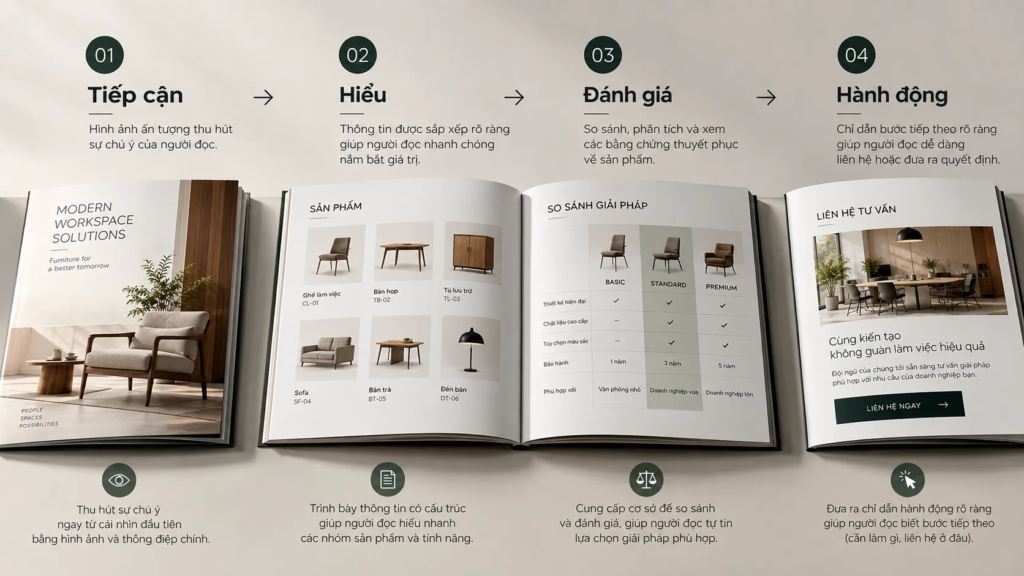
A beautiful catalog that does not lead to a next step has completed only half its task.
At the end of the viewing process, readers may need to do one of several things: find a product, request information, contact a salesperson, visit the website or continue the conversation.
A business should not force readers to hunt for contact information among dozens of pages.
A CTA in a catalog does not need to be strongly promotional either. A suitable invitation can be as simple as:
- Request product advice.
- Contact us for detailed information.
- Look up more of the range.
- Discuss your project needs.
- Learn more about the solution.
What matters is that the action fits the reader’s state.
A newcomer who is still exploring does not necessarily need an immediate call to buy. A customer who has already chosen a product needs contact details and a clearer next step.
“Strategic FOMO” should be used with conditions
Creating a sense of urgency can support decisions in some commercial contexts, but it is not a requirement for every catalog.
If the business genuinely has time-limited offers, limited allocations or pricing policies that change at set times, that information can be presented clearly.
Conversely, creating scarcity or urgency with no basis, only to push action, can reduce the publication’s credibility.
B2B catalogs need particular care here. When a purchase involves several parties, many criteria and a longer cycle, accurate information is usually worth more than short-term psychological pressure.
Transparent contact information is part of the brand experience
Contact information is often treated as the last thing to “fill in”. In fact, it is an important touchpoint.
If readers go through the whole catalog and cannot find the website, phone number, email, address or the right contact, the experience is interrupted at exactly the moment action is most likely.
So contact information should be planned as part of the information system:
- Easy to recognize.
- Easy to read.
- Consistency.
- Placed in a sensible position.
- Not competing visually with too many other elements.
If the catalog is used in both print and digital form, the business should also consider how the two connect, for example through a link or a QR code where it is genuinely needed.
Measure the catalog by commercial results, not only by aesthetic impressions

A catalog may be admired internally and still fail to create commensurate value in the market.
So after release, a business should find ways to observe how the catalog performs in the sales process.
You do not have to turn every square centimeter into a complex metric. What matters is identifying the relationship between:
the cost of producing the publication → how much it is used → customer response → commercial opportunity → business result.
If a product group is given a great deal of space but is rarely used by the sales team or draws little interest, that is a signal to reconsider.
Conversely, if a product group is regularly used in meetings and generates many follow-up requests, it may deserve higher priority in the next edition.
CHECKLIST
Questions to ask:
- Which main reader groups is the catalog serving?
- What decision do readers need to make after viewing?
- Which products truly play a strategic role in the range?
- Which information should be seen first, and which can be read later?
- Are the images helping readers understand the product, or just making the page prettier?
- Does each product group have a clear enough information structure?
- Does the typography create a readable hierarchy?
- Is the identity system consistent from page to page?
- Can readers easily find the next step and the contact information?
- Is there any post-release data that helps the business adjust the catalog in the next edition?
From a catalog to a brand asset that works
A catalog is most valuable when it stands between two worlds: the brand system on one side and business operations on the other.
If a catalog is seen only as a design publication, a business will focus on color, imagery and layout.
If a catalog is seen only as a sales listing, a business can easily turn it into a product table dense with information.
A fuller approach treats the catalog as a commercial communication system. It must express identity, organize the range, explain value, support search, build trust and open the way to the next action, all at once.
That is also why a good catalog does not necessarily need more pages, more images or more design effects. What matters is that every element in it has a reason to exist.
PRINCIPLE 02
The value of a catalog lies in what it helps readers decide
When strategy is set before design, products are planned by role rather than by quantity, images are used as information tools and CTAs are placed at the right moment, the catalog stops being a place to “display whatever the business has”.
It becomes a touchpoint that helps customers understand the business faster, evaluate the range more clearly and move closer to a suitable commercial decision.
FRESHBRAND
Is your company’s catalog currently designed to present products, or does it actually help customers understand and choose?
If you need to re-evaluate a catalog, start with the information structure, the role of each product group, the visual hierarchy and the action the publication is meant to lead to, before changing colors or layout.